
Under 5 Megabytes: A Full Native Image Stack in Your Browser
Every decoder, every encoder, metadata and a per-image quality search — all shipped in under 5 MB. The story of how we fit a server-class image pipeline into a single browser tab, and why almost no one else has.
Under 5 Megabytes: A Full Native Image Stack in Your Browser
Under 5 megabytes. That’s what your browser downloads the first time you open SciZone. Less than a typical podcast intro. And inside it is a full native image-processing pipeline — every decoder, every encoder, metadata, a per-image quality search, the whole catalog — running entirely on your own machine. No upload, no queue, no round-trip.
This is the story of how we got there, and why almost no one else has.
The starting question was small. Does this converter actually need a server?
The honest answer surprised us. The hard part of image conversion happens inside a native codec library, and a native library runs about as well in WebAssembly as it does on a Linux box. So we pulled the server out. Everything now runs on the machine the user is already holding. Faster, cheaper, and private by construction.
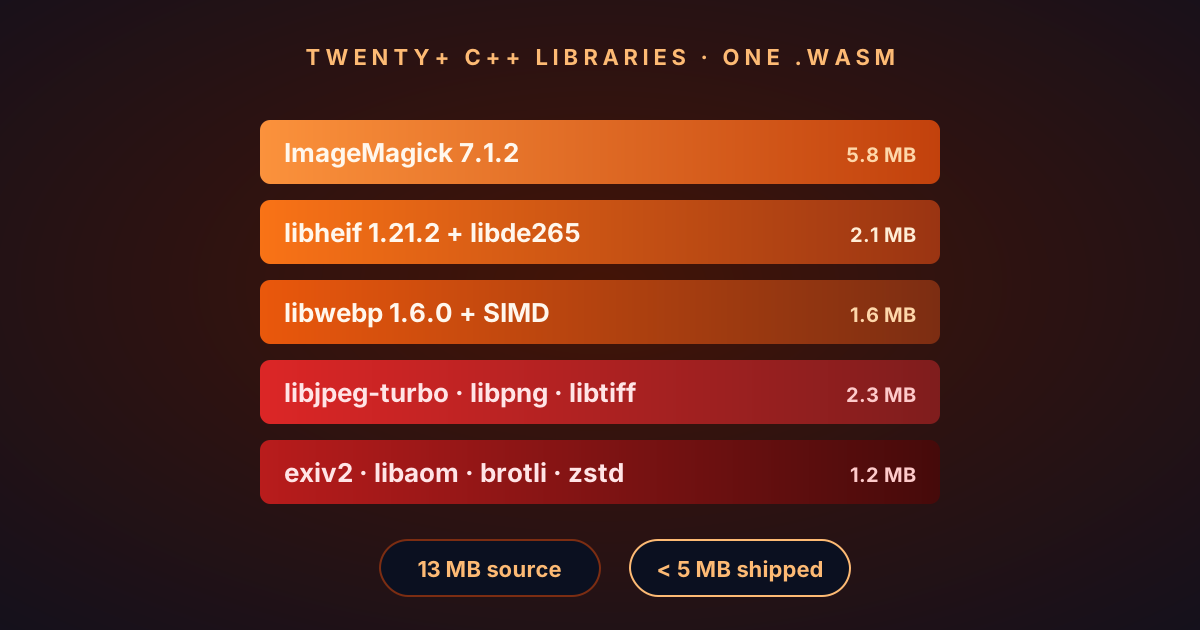
On the numbers. Under 5 MB to download, once. That’s the full decoder/encoder stack, including AVIF, HEIC, and the groundwork for RAW. The browser caches it forever after the first load, so the tool is there offline too. Everything below is how we fit this much work into a single-digit megabyte download.
If you want to see it before you read about it, open scizone.dev and drop a folder of photos on the page. Come back when you’re curious how it works.
Why we didn’t go server-side
Server-side image conversion is the obvious path. Pick a mature native library, wrap it in a small service, expose a POST endpoint. Done.
Then people actually start using it.
Bandwidth is real money. A gig in, half a gig out, multiplied by daily traffic, gets expensive fast. This is why every free converter quietly caps batch sizes. It’s not a technical limitation. It’s a cost containment measure.
Upload time dominates the experience. On a home connection, uploading 100 photos takes longer than converting them. Your users spend most of their time watching a progress bar before anything useful happens.
Privacy is a promise you can’t prove. Even a well-intentioned service can’t guarantee a file didn’t end up in a crash log or a backup snapshot. “We don’t store your files” is a policy, not something verifiable from the outside.
You become the bottleneck. Scale is your problem now. One slow batch degrades the experience for everyone.
Running in the browser fixes all four at once: no bandwidth bill, no upload wait, privacy you can verify in DevTools, and the user’s own CPU doing the work. The only reason more tools don’t do it this way is that it’s harder to build. So we built it.
The quality problem with fixed-quality converters
Most converters give you a quality slider. You pick 80. That gets applied to everything.
This is a bad default, because image complexity varies enormously. Quality 80 on a flat logo wastes bytes — you could cut the file in half with no visible change. Quality 80 on a high-detail portrait introduces artifacts — you needed 87 to stay above the “looks the same” line.
Our approach: search for the right quality per image, automatically. Two perceptual targets ship as presets.
- Excellent (default). PSNR ~42 dB on WebP, ~38 dB on AVIF. Indistinguishable from the original on natural photographs; tuned so AVIF can actually beat WebP on JPG sources rather than faithfully preserving every DCT artifact of the input.
- Visually Lossless. PSNR ~44.5 dB on WebP, ~42 dB on AVIF. Archival-grade, at the cost of some compression ratio.
Both presets also demand SSIM ≥ 0.95, so edges, textures, and gradients survive intact.
The algorithm:
- Find the hardest part of the image. Locate the highest-entropy region — the block with the most complex detail. That’s the worst case for compression quality.
- Binary-search the quality setting. Encode that block at various quality levels, measuring PSNR and SSIM, until we find the lowest setting that passes both thresholds.
- Full encode at the found quality. Run a final encode of the whole image, then copy EXIF/XMP/ICC metadata onto the output.
Overhead is about 1.2–1.5× a single encode. The payoff: every output file is at the optimal size for its content. No wasted bytes on simple images, no artifacts on complex ones, and the user doesn’t have to think about quality sliders at all.
What that actually buys you
We swept 24 photographs — portraits, landscapes, flat lays, architecture, night scenes, deliberately diverse — through both presets. The goal was to land both formats at the same perceived quality and compare file sizes. Quality is measured with SSIM here; it’s a better proxy than PSNR for “looks the same” on natural photographs.
| Preset | WebP SSIM | AVIF SSIM | ΔSSIM | WebP ratio | AVIF ratio | AVIF vs WebP |
|---|---|---|---|---|---|---|
| Excellent (PSNR 42) | 0.9754 | 0.9721 | 0.003 | 1.68× | 2.92× | −45% |
| Visually Lossless (PSNR 44.5 / 44) | 0.9845 | 0.9807 | 0.004 | 1.24× | 2.16× | −45% |
Two things worth calling out. First, the two formats land within 0.005 SSIM of each other on every preset — the headline size win is honest, not an artifact of mismatched quality. Second, AVIF comes in ~45% smaller than WebP at matched quality, a bit above the 20–30% commonly cited. That’s not encoder magic. It’s what happens when a per-image quality search is paired with tile-parallel encoding, so AVIF can actually hit its quality ceiling in seconds rather than making you choose between speed and file size.
Why our AVIF encode is faster than every other browser-based converter we could find
AVIF is where most browser-based converters fall apart. The encoder underneath it is AV1 — the open video codec — and encoding AV1 is genuinely expensive. Most in-browser AVIF tools ship it with the defaults: one tile per image, internal threading only, and often no cross-origin isolation at all. That combination caps the encoder at one thread per image on non-isolated pages, or roughly four threads on isolated pages where the encoder’s internal pool can kick in. A 12 MP photo takes 60+ seconds.
We do three things differently. Together they land AVIF encode at near-linear scaling with core count on large photos — the kind of speedup you normally only get from a server-side pipeline.
1. Real threads inside the browser. Modern browsers can hand WebAssembly a pool of native threads, but only if the page is served with the right isolation headers. Most in-browser AVIF tools skip that step — usually because those headers tangle with embedded third-party assets — and silently single-thread the encoder. We don’t skip it. Every response we serve clears that gate.
2. The AV1 encoder compiled to use all of them. By default, the encoder is happy with a handful of threads. Ours is configured to pull from the full pool, so every core the browser exposes actually does work.
3. Tile-parallel encoding, picked adaptively per image. This is the non-obvious win. By default, the encoder runs one tile per frame, which means AV1’s own frame-level parallelism is the bottleneck — it caps out around four threads no matter how many cores you have. We split the frame into several tiles, so each tile encodes in its own thread and the whole pool drains in parallel. The tile count scales with available threads, with a floor per tile so small images collapse back to a single tile rather than paying a compression penalty.
The numbers from our 12-JPG test folder: single-tile default path, 62 seconds. Tile-parallel across the pool, under 10 seconds. Same quality target, same encoder, same input. Every other in-browser converter we tested sits near the 62 s end.
Server-side tools are still faster per image — they have AVX-512, no wasm32 memory ceiling, no browser sandbox overhead. But we don’t send your files anywhere.
The memory-aware worker scheduler
A single WebAssembly instance can only use one CPU core, and running it on the main thread freezes the UI. The naive fix is Web Workers — one per logical core, each running its own WASM instance. That works fine when every image is roughly the same size. It falls apart the moment someone drops a mix of 1 MP JPEGs and 100 MP scans into the same batch: spin up eight workers that each want a 2 GB wasm heap, and the tab dies.
We replaced the fixed-size pool with a memory-aware scheduler. Per file:
- Peek dimensions first. Before any encode, we read each file’s dimensions cheaply — no expensive decode yet, just enough to estimate what it will cost.
- Estimate heap footprint from pixel count. AVIF is heavier per pixel than WebP, and each needs a different budget.
- Gate dispatch on available RAM. We ask the browser what the device can afford and reserve headroom. If the next file doesn’t fit the budget, the scheduler skips to a smaller one behind it instead of head-of-line blocking.
- Split cores across in-flight encodes dynamically. A lone encode grabs every core; two split 50/50; four split evenly. Those threads flow into the tile-parallel path.
A few other things that bit us along the way:
Memory grows over time. The wasm allocator doesn’t fully release memory between jobs. Solution: recycle each worker on a regular cadence. Cold-start is quick enough that it’s cheap to do freely.
Transfer, don’t copy. Moving a 50 MB TIFF to a worker as a copy stalls the UI. Moving it as a transfer doesn’t. We transfer.
Nothing gets lost if the tab crashes. Finished files land in a local browser store before the ZIP is built. If something goes wrong halfway through a batch, everything that already finished is still there.
What breaks at 1000+ images
Scale surfaces problems that demos don’t.
Memory at the extremes. 200+ MB TIFF scans and gigapixel panoramas can push a worker’s heap toward the wasm32 4 GB ceiling. The scheduler’s footprint estimate means a 100 MP encode runs by itself rather than alongside seven siblings competing for the same heap.
ZIP streaming. Building a 10 GB ZIP in memory works until it doesn’t. We stream entries out as each file completes, so the save dialog opens long before the last image finishes.
Cancellation. If a user cancels, cancellation has to work without corrupting a currently-encoding worker. Our approach: terminate and recreate. Simple, and the restart is fast enough to be invisible.
Quality warnings. Some images can’t hit the PSNR/SSIM thresholds even at maximum quality — typically very high-ISO noise or heavily pre-compressed files. We surface a visible warning rather than silently shipping a file that missed the target.
What’s actually inside
Under the hood it’s a full native decoder/encoder stack: the workhorse libraries that handle JPEG, PNG, TIFF, HEIF, WebP and AVIF on most desktop apps, compiled into a single WebAssembly binary. Metadata — EXIF, color profiles, GPS — rides through intact. Total download: under 5 MB, once. After that it’s cached and the tool works offline.
What’s coming next
A few things on the roadmap we’re genuinely excited about:
Animated WebP and AVIF from GIF and APNG inputs. Both codecs support animation; the pipeline doesn’t yet.
A native CLI and an MCP server sharing the same core — the same conversion quality from a terminal or an LLM tool chain, not just a browser tab.
RAW support. The most-requested missing format.
The takeaway
Browsers in 2026 can run the full native image processing stack. A well-tuned WebAssembly binary isn’t meaningfully slower than a native process for most image workloads. The only real cost is the one-time under-5-MB download, which is cached forever after that.
If you’re building anything image-adjacent and your first instinct is “I’ll spin up a processing server,” ask whether that server actually needs to exist. Often it doesn’t.
The result is live at scizone.dev. Drop a folder of photos and watch your browser do the work.